Before the Auction] To check the status of items for sale
Exhibit and Invoice site
Select the auction you wish to participate in ▶
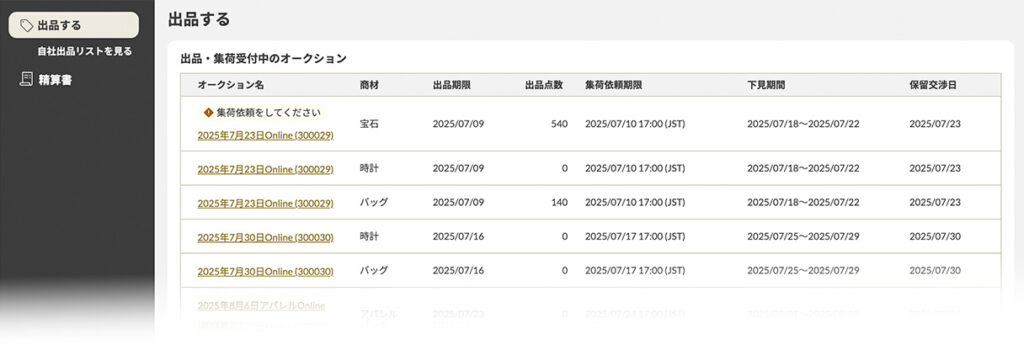
Please select the auction you wish to participate in from the "Sell" menu on the left.
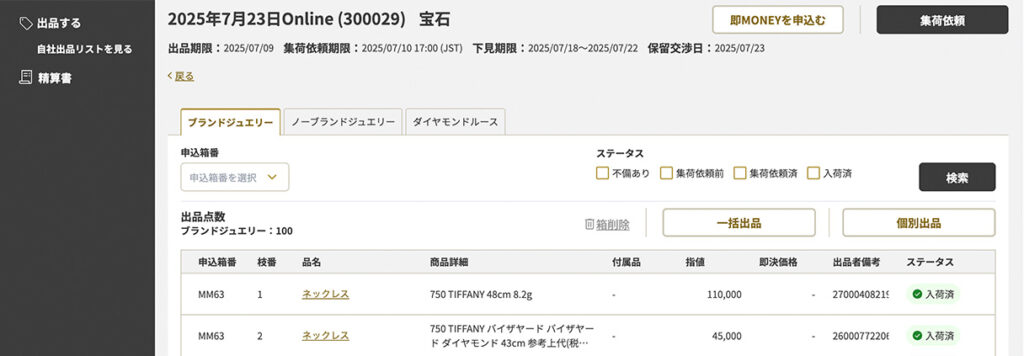
Please check the status of your listed items and request pickup as soon as possible for items that have not yet been requested for pickup.
status icon
The item has not yet been requested for pickup. Please make a pickup request by the due date.
The product has already been requested for pickup. After the goods are picked up, they will be shipped to the office.
The product has arrived at the office and is being inspected.
商品詳細を編集・確認する
商品の詳細編集や集荷状況の確認は、【自社出品リスト】内の各商品詳細ページより行えます。

■ 集荷された商品の状況を確認する
【自社出品リスト】の商品詳細より、現在の配送状況をご確認いただけます。 ※クリックすると外部サイトへ遷移します。
■ 商品詳細を変更する
画面右上の【編集】ボタンから変更が可能です。
◎受付期限: 下見前日の18:00まで (以降はリスト作成のため、変更を受け付けられません)
※出品中の商品に情報修正が行われた場合、その内容を「情報修正のご連絡」として、1日1回メールにてお届けします。
■修正があった商品を一覧で確認する
『自社出品リスト』から、登録情報と検品後に修正された内容が一覧でご確認いただけます。

■自社出品リストをダウンロードする
出品リストは、「オークション名」「商材」ごとにダウンロードいただけます。


After the Auction] When confirming the results of the auctioned items
Please note that the page you check depends on the time you check.
Bidding Deadline 17:00~.

Bidding site "Bid List".
Narrow down your search by bidding results "Top Bid
Pending negotiation date 7:00~.

Portal site "Bid List"
Please refer to the "Results" section.