Site Migration for Pending Negotiations and
Announcement Regarding the “Seller Management Balance” Feature

Thank you very much for always using KOMEHYO Auctions.
To make trading even more convenient for our members, we will be completely revamping the “Hold Negotiation Menu” at
starting with the auction on Wednesday, June 24!

Transition from a [Portal Site] to an [Online Auction Site]

Here's What's Changing! Two Benefits

We can respond immediately after the bidding closes!

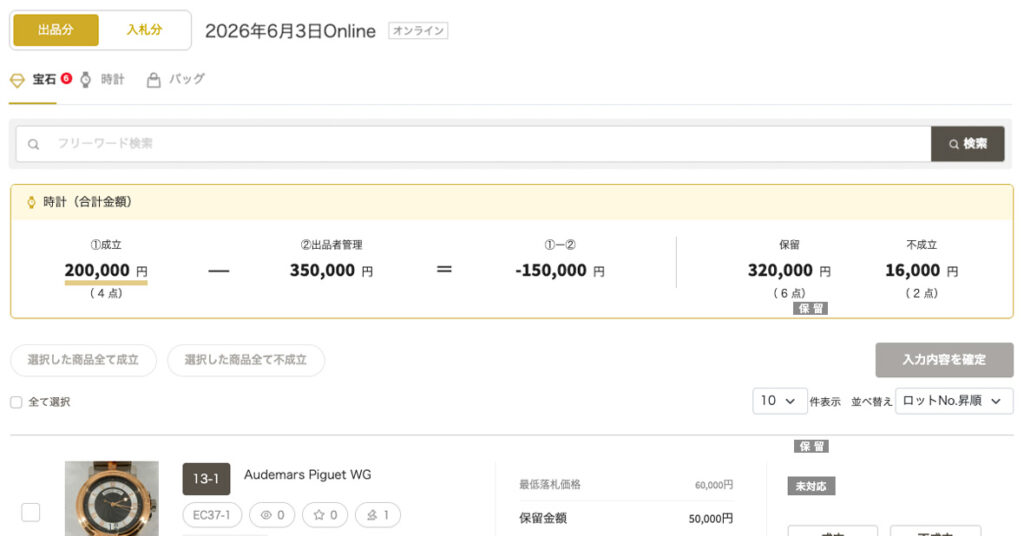
After the bidding ends, you will be able to immediately initiate hold negotiations for the listed items within the online auction site (bidding site).

Save time by eliminating the need to compare with your own lists and data! The “Seller Management Amount” feature

On the hold negotiation screen, the “Suggested Price” previously registered by the seller will now be displayed alongside the hold amount. You no longer need to compare it with multiple lists on hand.

About “Seller Management Amount”

We’ve introduced a new feature called “Seller Management Amount” to help make negotiations with sellers regarding held items run more smoothly.
We hope you’ll take advantage of this feature.
Simply enter your desired price in advance when listing your item.
When a hold negotiation occurs, this amount will be displayed as a “Reference Price” on the member’s screen only.

Since the threshold amount is displayed on the screen, it becomes easier to determine whether a transaction is approved or rejected.

How to Register

You can register in the following two ways from the "Exhibitor Registration and Invoice Site".

Individual Listing Registration: You can enter the “Seller-Managed Amount” directly for each item on the listing registration screen.
Bulk Listing (Excel Upload): Please use the latest Excel template available for download from the listing page, enter the “Seller-Managed Price” in the designated column, and upload the file.
*Please be sure to download and use the latest Excel template.

Schedule and Registration Period for “Seller Management Amount”

The input for the new feature has already been Listings · Invoice website You can register here.

Target AuctionTarget Auction
Items Listed for the July 8 Auction~ Wednesday, June 24, 11:59 p.m.
Items listed after the July 15 auctionYou can enter information at any time during the regular listing period.

[Important Notes Regarding Registration and Getting Started]

Regarding the Display of Registered Amounts:
While you can register “Seller-Managed Amounts,” these amounts will not actually be displayed until the hold period for auctions starting on July 8 or later. (*The amounts you have registered are securely stored within the system.)

About Changes After Registration:

Once you have registered your “Seller Management Amount,” you cannot delete or change it after the registration period ends. Please carefully review the information you have entered before registering.

Regarding the Display Period for Seller Management Balances:

You can only check the listing registration period and the hold negotiation period.

If you have any questions regarding this matter, please contact the secretariat listed below.

KOMEHYOオークション事務局
TEL: 0120-252-226
Mail: auction@komehyo.co.jp
受付時間: 10:00 〜 19:00